Bulk Posts (CSV Import)
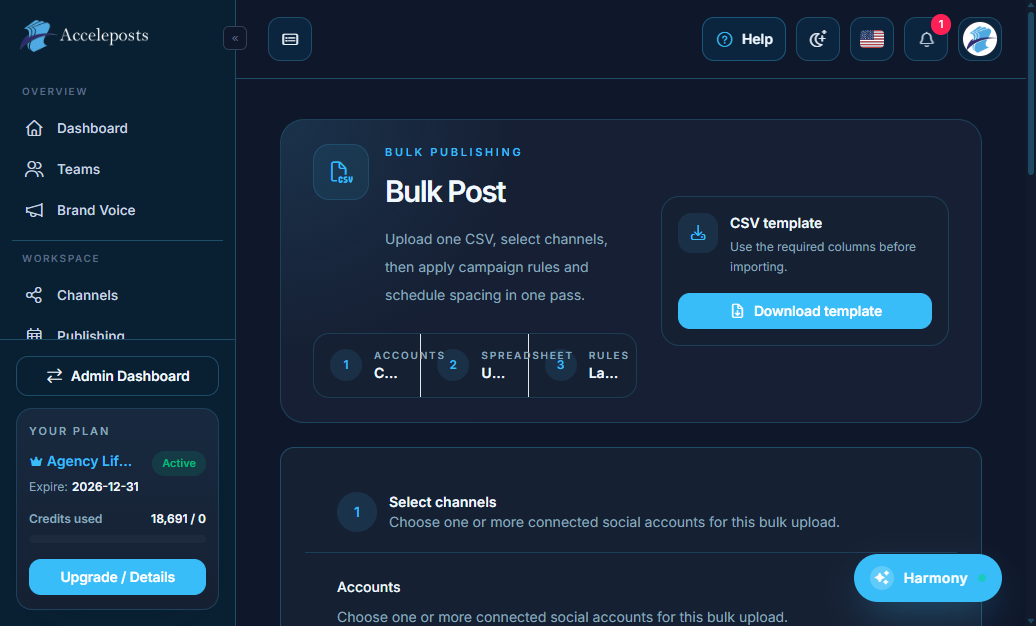
Upload a single spreadsheet to queue dozens of posts at once instead of creating them one by one.
What It's For
Bulk Posts is built for agencies and high-volume accounts that already plan content in a
spreadsheet. Instead of retyping captions into the composer, you import a CSV, map it to one or
more connected channels, and let AccelePosts turn every row into a scheduled post.
Where To Find This In AccelePosts
- Sidebar: **Workspace > Bulk Posts**
- Route: `/portal/bulk-posts`
- Requires the `bulk_posts` plan permission; the number of rows per CSV allowed is also
plan-controlled (`max_bulk_posts_per_csv`).
Step-by-Step Workflow
- Click **Download Template** to get the required CSV column headers.
- Fill in one row per post (caption, media URL, optional hashtags/schedule time).
- Under **Select channels**, choose one or more connected social accounts to publish to.
- Set campaign rules and spacing — for example, spread 50 rows 30 minutes apart instead of
firing them all at once.
- Upload the CSV and review the row count AccelePosts detected.
- Submit the batch. Rows are queued and processed in the background
(`ProcessBulkPostBatchJob`), so large batches don't block the page.
- Return to the Bulk Posts page to see batch status and row counts per batch.
Validation Checklist
- The template columns match exactly — renamed or reordered headers can cause rows to import
with blank fields.
- The selected accounts are active, connected channels (not disconnected/expired tokens).
- The row count shown after upload matches what you expect from the spreadsheet.
- Spacing/rules produce a sane publish schedule — check the first and last post times.
Common Mistakes To Avoid
- Exceeding the plan's rows-per-CSV limit — large batches may be silently capped.
- Leaving media URLs pointing to private/unpublished files that channels can't fetch.
- Re-uploading the same CSV twice, which creates a duplicate batch instead of editing one.
Troubleshooting
- If a batch finishes with failed rows, open the batch to see per-row error messages.
- Reconnect any channel shown with a token/auth warning before retrying the batch.
- For very large CSVs, split into smaller batches if processing stalls.