Bot Manager Overview
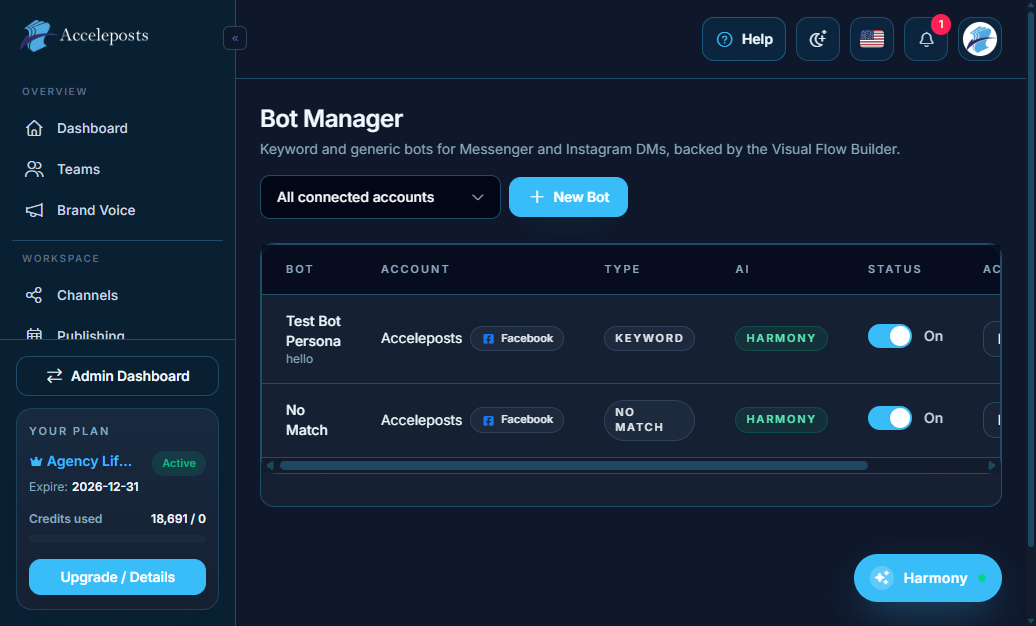
Bot Manager runs automated chat experiences on your connected messaging channels — auto-replies,
comment automation, live chat handoff, and subscriber broadcasts all live here.
What It's For
Bot Manager covers the full lifecycle of a conversational bot: build it in **Flow Builder**,
attach it to a connected account, then manage it from the other Bot Manager tools —
**Live Chat** (human handoff), **Subscribers** (contact lists), **Comment Automation**
(auto-reply to comments), **AI Concierge** (AI-driven replies), **Postback Manager**, **Persistent
Menu**, **Notifications**, **User Input Flows**, and **Variables** (reusable values inside flows).
Where To Find This In AccelePosts
- Sidebar section: **Bot Manager**
- Bots list: `/portal/bot-manager`
- Flow Builder: `/portal/bot-manager/flows`
- Live Chat inbox: `/portal/bot-manager/inbox`
Step-by-Step Workflow
- Open **Bots** and confirm the channel account you want to automate is connected.
- Build a conversation in **Flow Builder** (see the dedicated Flow Builder page).
- Attach the flow to a bot/account and set it live.
- Use **Domain Whitelist** if the bot is embedded on a website widget, to restrict which
domains can load it.
- Monitor conversations in **Live Chat** and jump in manually whenever a bot flow isn't enough.
- Check **Analytics** periodically to see reply volume, flow completion, and drop-off points.
Validation Checklist
- The bot replies correctly to a real test message sent from the connected channel.
- Live Chat shows the conversation thread in real time, not just after a page refresh.
- Comment Automation rules only trigger on the posts/keywords you intended.
Common Mistakes To Avoid
- Publishing a flow without testing every branch — untested paths can dead-end a conversation.
- Leaving the Domain Whitelist empty for an embedded widget, which can allow it to load
anywhere.
- Forgetting to update Persistent Menu options after restructuring a flow.
Troubleshooting
- If a bot stops responding, check the account's connection/token health on the Channels page.
- Review **Postback Manager** if a button/menu action isn't triggering the expected flow step.
- Use **Variables** to debug — log a variable's value mid-flow to confirm what the bot is
actually receiving from the user.